
The short answer. Download our free chair massage sign-up sheet as a printable PDF or a spreadsheet for Excel or Google Sheets. No email needed. It has 15-minute and 20-minute time slots with breaks for the therapist already built in, a blank page for your own times and breaks, and a waiting list at the bottom.
We've been running chair massage days in offices since 2017, and the first ones ran on a paper sheet pinned up in the break room. A good sheet still does the job for a one-off day or a small office. This one has the breaks already in, a waiting list, and a few short notes that save you answering the same questions on the day. It won't stop people switching slots, but it makes the day easier to follow.
If you're the office organizer, this is the sheet to put up once your therapist has given you their times. And if you're not running massage at all, change the title, the line under it and the notes in the spreadsheet, and it works for any sign-up with time slots.
What's on the time slot sign-up sheet
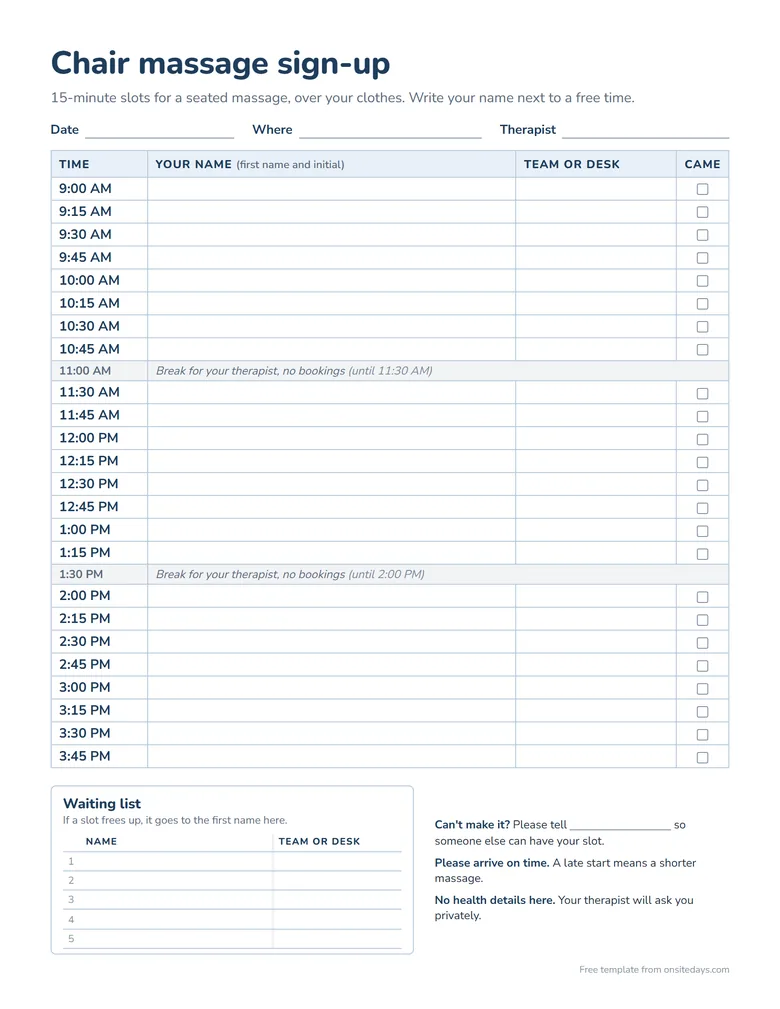
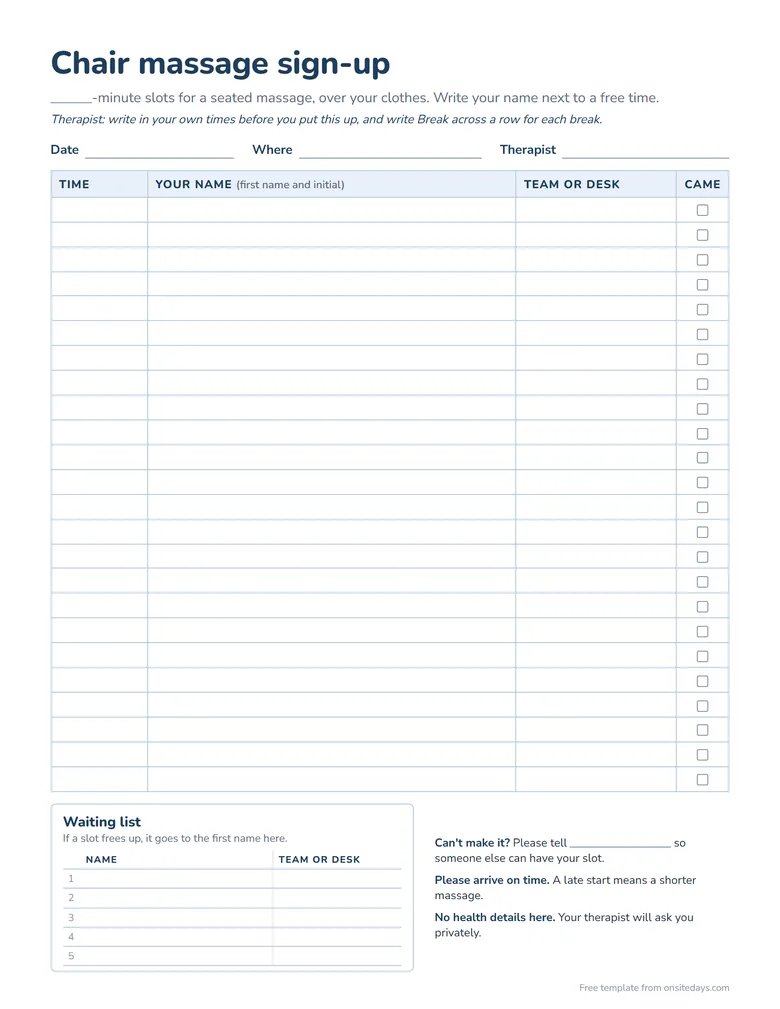
Each page has a space at the top for the date, the room and the therapist's name, then these columns.
- Time. Filled in on the first two pages. The third is blank, so you can write in your own times and mark your own breaks.
- Your name. First name and initial is plenty, and the sheet says so.
- Team or desk. So the therapist or organizer can find someone who's running late, without asking for a phone number.
- Came. A box for the therapist to check. At the end of the day you know who came and who didn't, which is useful if the company asks how the day went.
The day runs from 9:00 AM to 4:00 PM, with a 30-minute break after every two hours of massage, which is what we plan for ourselves. At the bottom there's a waiting list with five lines for a name and a team or desk, and three short notes for the people signing up. They ask people to say if they can't make it, to arrive on time, and not to write health details on the sheet.
The spreadsheet has the same three pages as tabs, plus a "Your own times" tab that fills the times in for you. You type the first time, the session length and the break length into the yellow boxes beside the sheet, which don't print from Excel. In Google Sheets, select columns A to D, choose Print, then Selected cells. Type "Break" in a name box and every time after it moves on by the break.
Setting up the sheet before the day
Pick the session length. Most office chair massages are 10, 15 or 20 minutes. Fifteen lets more people take part, and twenty gives each person longer to relax. For 10-minute slots, use the "Your own times" tab or the blank page. Each has 24 rows, and every break uses one, so for a full day use two copies, starting the second where the first ends. Our guide to chair massage prices in the US has a table of how many people each length fits into a day.
Allow for the turnover. The slots on the sheet run back to back, so in a 15-minute slot you'll give about 13 minutes of massage and use the last couple of minutes to wipe down the chair and welcome the next person. That's why the sheet says "15-minute slots" rather than "a 15-minute massage". If you'd rather give a full 15 minutes, use the 20-minute slots instead.
Keep the breaks. It's tempting to fill them to fit more people in, but a full day of chair massage is hard on your hands and back. The breaks also stop one late start at 9:00 AM from pushing back every slot after it.
Print one sheet per chair. With two therapists, put up two sheets side by side with each therapist's name at the top, rather than one long list.
Fill in who to tell. On the PDF, write the organizer's name by hand on the "Can't make it? Please tell" line once it's printed. In the spreadsheet, type it on that line before you print or share it. People are more likely to say they can't come when they know who to tell.
Putting it up, or sharing it in Excel or Google Sheets
On paper. Put it somewhere everyone walks past, such as the break room, the coffee machine or reception, about two weeks before the day, and leave a pen tied to it. Ask the organizer to email everyone a photo of it too, so people on other floors or working from home know it's there.
In Google Sheets. Upload the spreadsheet to Google Drive and double-click it, and it opens in Google Sheets. Then, from the File menu, save it as a Google Sheets file, so everyone edits one copy (Google's help page explains this). Share it so anyone with the link can edit, and ask the organizer to send the link around. Anyone who can edit can also delete a name by mistake. If that happens, the sheet's version history shows it as it was (Google explains how).
In Excel, on Microsoft 365. If the office uses Microsoft 365, save the spreadsheet to OneDrive or SharePoint, open it in Excel for the web and share the link from there. Several people can type in it at the same time (Microsoft's help page explains how).
Keep health questions off the sheet
A sign-up sheet is read by everyone who walks past it or opens the link, so it's the wrong place for anything about someone's health. Ask your pre-massage questions privately instead, either in the chair before you start or on a separate form that only you see. Hand out our free chair massage intake form as people arrive.
Where sign-up sheets go wrong
Most of our early days went wrong in the same few ways.
- Swaps and cross-outs. People change slots by crossing a name out and writing it somewhere else, and by the afternoon nobody is quite sure who's coming when.
- Nobody gets a reminder. People sign up two weeks ahead and forget. Ask the organizer to send a short message the day before with the sheet attached, and another that morning.
- Empty slots on the day. On most of our days, a name or two never turned up. Usually that slot is lost, so take it as a short break. Now and then the next person on the waiting list sits nearby and can be in the chair in a couple of minutes, so it's worth a quick message.
The same day as a booking link
Once the same offices book you again and again, the sheet starts to cost you time. That's why we built Onsite Days. You set up the day with the same session length and breaks as the sheet, and send the organizer one link to share.
- A slot disappears as soon as someone takes it, so nobody can write over anyone else.
- Each person gets their own confirmation, with a link to change or cancel their slot.
- They answer your pre-massage questions privately when they book, so there's nothing to fill in at the chair.
- You see who's booked on your phone, and you can add anyone who walks up on the day.
- On the paid plans, reminders go out at the times you choose, and if you turn on the waiting list, a canceled slot is emailed to the next person in line.
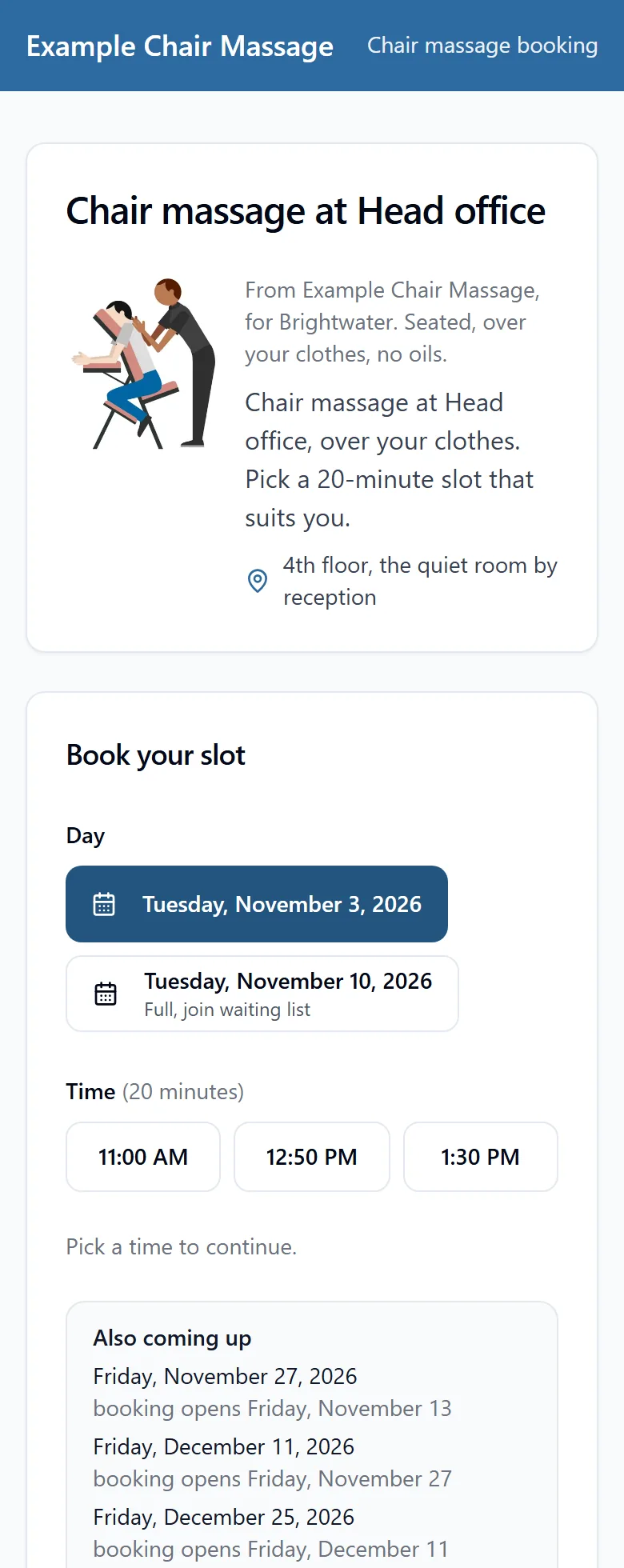
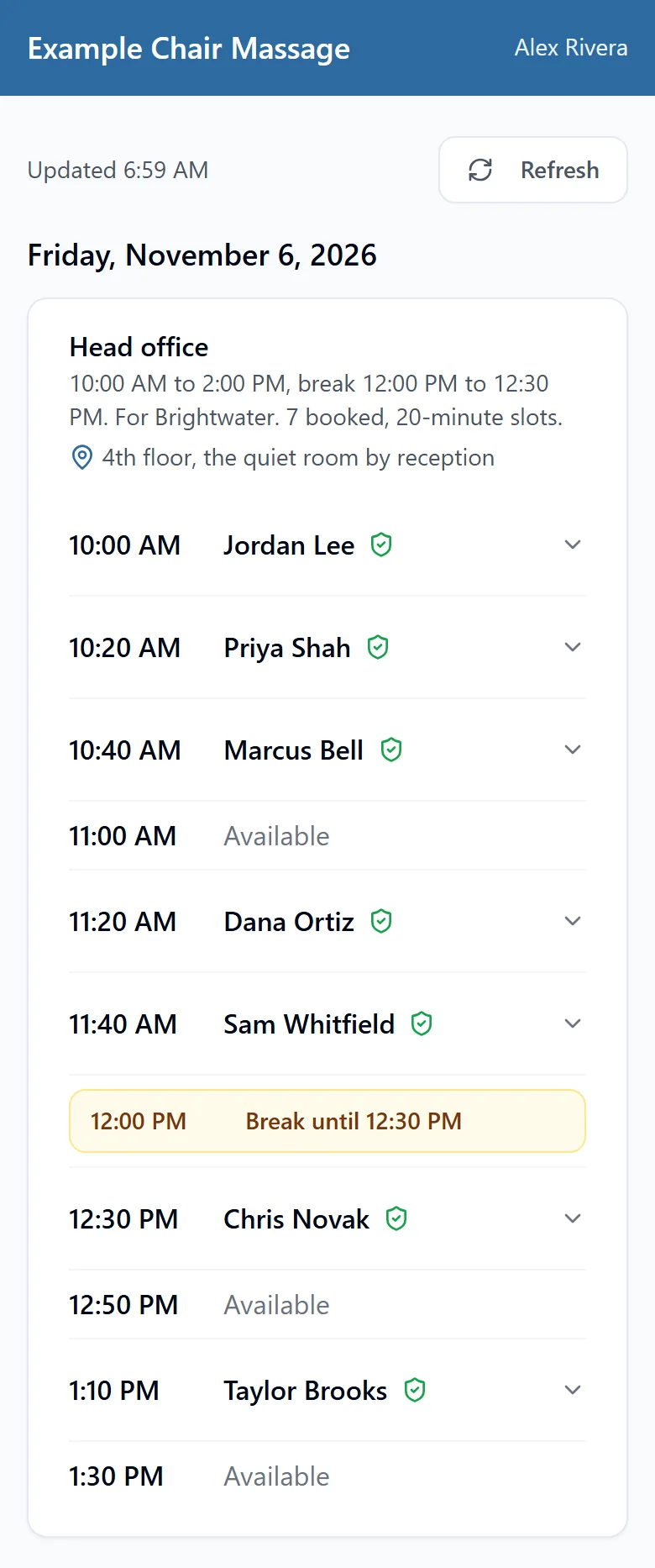
An example account. The business, the company and the people are all made up.
Free covers one office, one therapist and one day a month, so you can try it on your next day. Solo (US$15 a month) adds reminders, the waiting list and your own logo. See pricing. If you're weighing it up against other tools, our guide to SignUpGenius alternatives for chair massage days compares them.
Quick checklist
- Pick 15- or 20-minute slots, or use the blank page for your own times and breaks
- Keep the breaks in
- One sheet per chair, with the therapist's name at the top
- Write in who to tell if someone can't make it
- Put it up about two weeks before, and ask the organizer to email a photo or the link
- No health details on the sheet
- A reminder from the organizer the day before and that morning
- On the day, message the next person on the waiting list if a slot frees up early, and check off who came
- Your clothes and shoes for the day. See what massage therapists wear
- A small stack of business cards by the chair. Make yours with our free business card maker