
The short answer: give everyone one booking link, open bookings about two weeks before the day (or whenever suits the company), and let people book, change and cancel their own slot. Build your breaks into the timetable and keep the list on your phone on the day. A booking tool made for chair massage days, such as Onsite Days, does all of this for you, and it's free to start.
We've been running on-site chair massage days at offices since 2017. In that time, the only days that went wrong were the ones where staff organised the booking list themselves. The massage was never the problem. The list was. This guide covers what we've learned about taking bookings, so the day runs smoothly for you, the company and everyone who books.
Three ways to take bookings
A paper sign-up sheet. It's simple, and it works for a small team in one room. But only people who walk past it can sign up, nobody gets a reminder, and changes turn into crossings-out. By the afternoon it's hard to read. If you'd still like a paper sheet, we've made a free chair massage sign-up sheet with the breaks built in. It's on US Letter paper, so choose Fit to page when you print it on A4.
A shared spreadsheet. Google Sheets or Excel feels like the obvious answer, and we've used both. In our experience it's where things go wrong. Anyone can type over someone else's name or delete a row. People swap slots without telling anyone, forget which time they put down, and cancel by simply removing themselves. By the day, nobody is quite sure who's coming when, and the therapist and the office manager both spend the morning sorting it out.
A general appointment app. We've used one in the past. Apps like these work well for one-to-one appointments, but they aren't made for office massage days, so you end up working around them. We compare the main ones in our guide to massage booking software for office days (written for the US, so prices are in US dollars).
A booking link made for chair massage days. One link for everyone at the company. People pick a free slot, get their own confirmation, and can change or cancel it themselves. You see the up-to-date list wherever you are. This is the approach that has worked best for us, and it's how Onsite Days works: you set up the day, share one link, and the bookings look after themselves.
What a good booking set-up needs
- One link for everyone. The company can share it however suits them: an email from HR, a message on Teams or Slack, or a poster in the kitchen. Most do all three.
- Bookings that open at the right time. About two weeks before the day works well, and you can change it to suit each company. It's long enough for people to plan, and short enough that they don't forget.
- Slots that include your breaks. Plan breaks into the timetable from the start, ideally 30 minutes every two hours, so nobody can book over them.
- Health questions answered before anyone sits down. If people answer the pre-massage questions when they book, you're not doing paperwork in the chair. If you still need a signed record, use our free consultation form.
- A confirmation with a change or cancel link. When people can move their own slot, they do. When they can't, some simply don't turn up.
- A reminder before the day. People book two weeks ahead and forget. A reminder the day before makes a real difference.
- The list on your phone. On the day, you want to see who's booked at a glance, not chase a printout.
Onsite Days does all of these for you, with reminders on the paid plans. See how it looks.
The two weeks before the day
- Agree the details with the company: the date, start and finish times, slot length, and where you'll set up.
- Set up the day: your times with breaks built in, a slot length of 15 or 20 minutes, and how many chairs. In Onsite Days, you set all of this when you add the day. If you're not sure how to price it, see our guide to chair massage prices and what to charge for an office day.
- Open bookings about two weeks before, or whenever suits the company, and send the link to your contact at the company to share with everyone.
- Check in a few days before. If there are still free slots, ask your contact to send the link round again. A second message often fills them. Check your kit and your uniform the week before, including a spare top.
- Before the day, everyone booked gets a reminder. Onsite Days sends these for you on the paid plans, at times you choose.
On the day: late arrivals, no-shows and walk-ups
If someone is late, they get a shorter massage. Running over to make up their time pushes everyone after them back, and the day slowly falls behind.
If someone doesn't turn up, the slot is usually lost. With 15 or 20 minute slots there isn't time to find someone else and get them to the chair. Treat it as a short break, and carry on with the next person.
Walk-ups are fine when there's a free slot, and you can add them to the list there and then (in Onsite Days, with Book someone in). In practice, though, when booking online is easy, most people book ahead.
Keep a few business cards by the chair for anyone who asks how to book you again. You can make them with our free massage business card maker.
How Onsite Days organises it for you
We built Onsite Days for exactly this: booking office chair massage days, for therapists and agencies. Here's what it looks like for the people booking, and for you on the day.
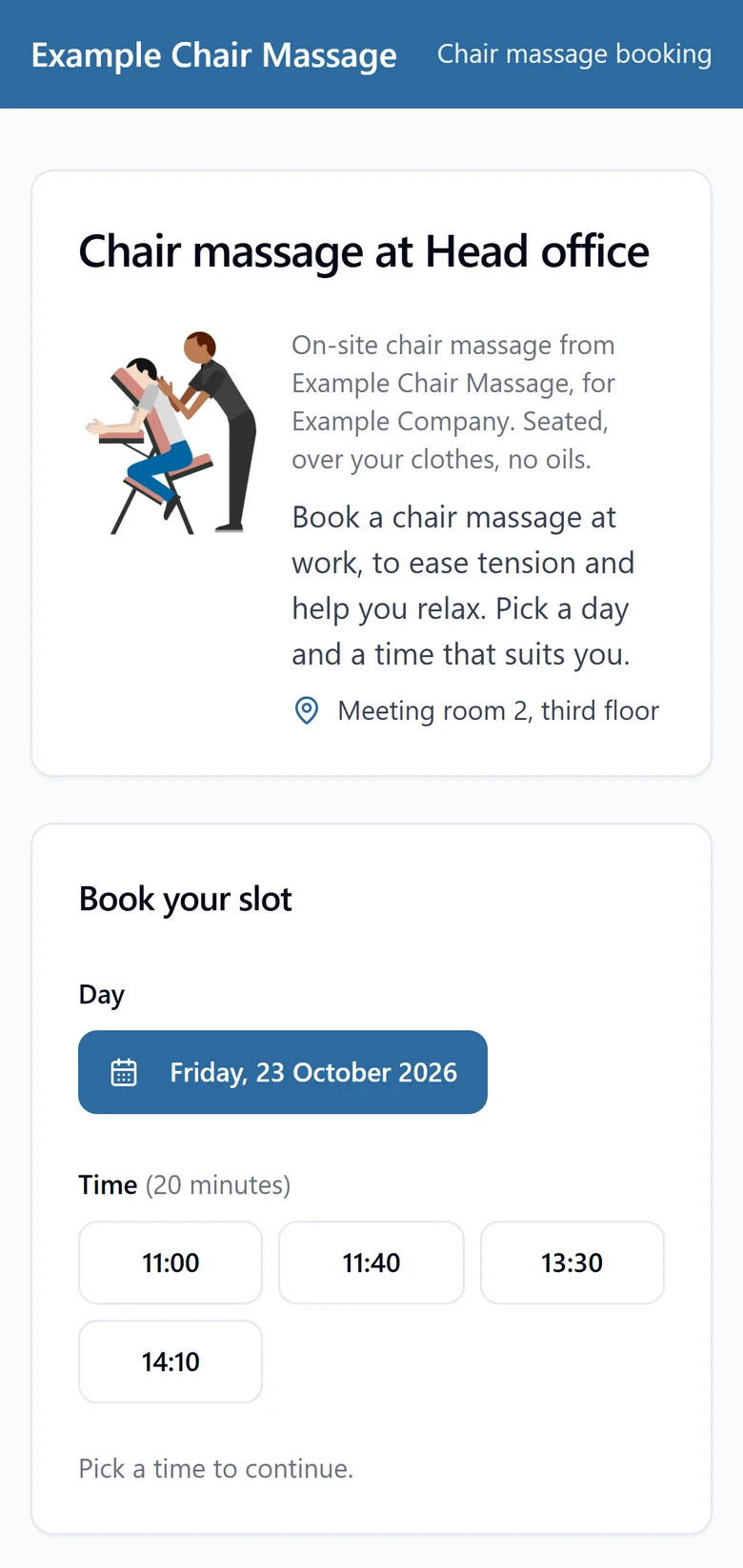
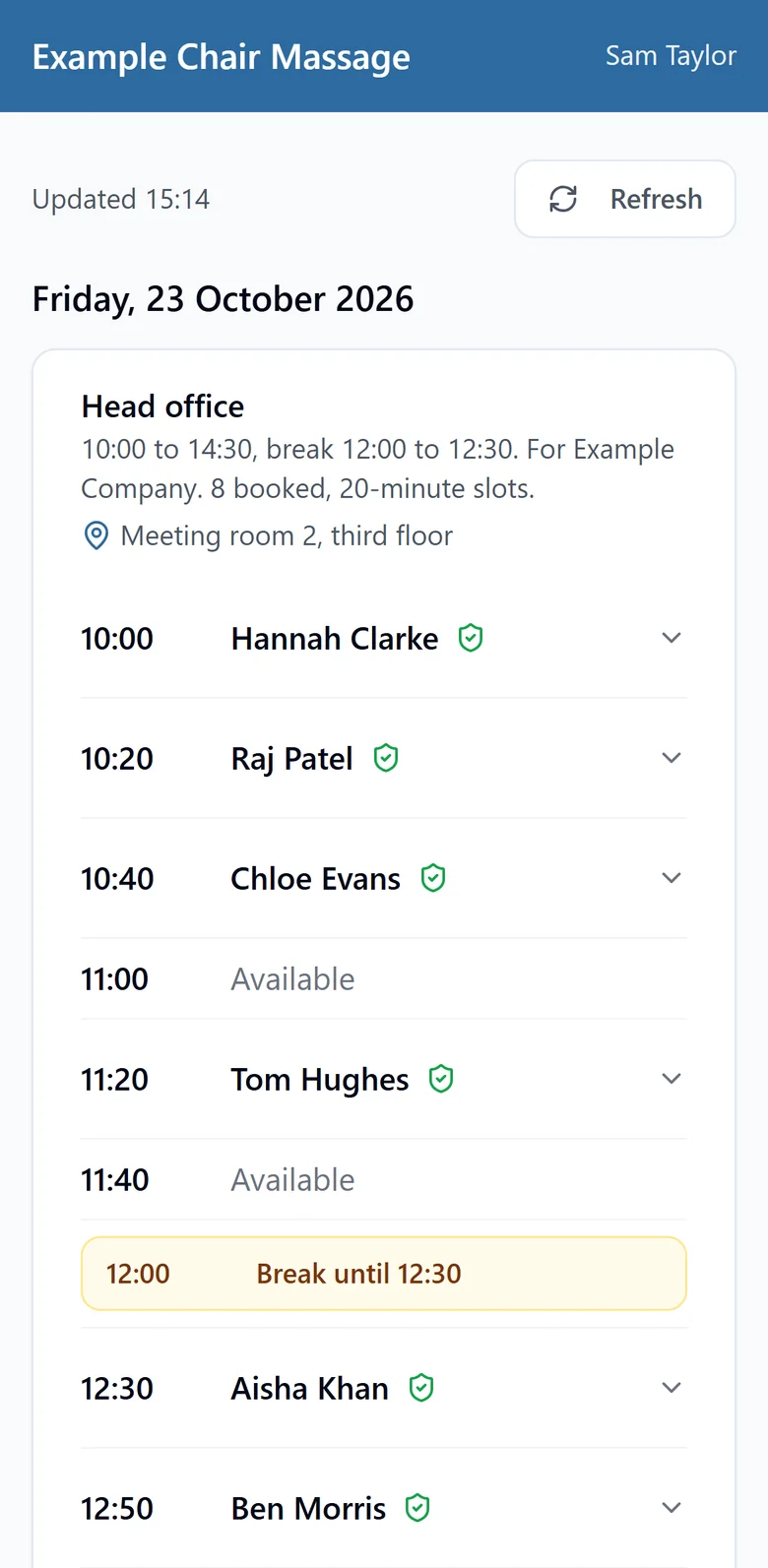
An example account: the business, the company and the people are all made up.
Here's how it covers each step above:
- One booking link for each client site, ready to email, post on Teams or Slack, or put on a poster.
- Bookings open 14 days before the day unless you choose a different date.
- Your timetable, your way: set your slot length, a few minutes between people if you want them, and your breaks, so nobody can book over them.
- Pre-massage health questions answered by each person when they book. You choose the questions.
- Confirmation emails with a link to change or cancel, so people move their own slot instead of messaging you or the office manager.
- Reminders at times you choose, such as the day before or an hour before, so fewer people forget.
- Your bookings on your phone, with each person's name and time, so there's no printout to manage.
- Book someone in for walk-ups on the day.
- A simple report for your client afterwards, showing how many slots were booked and how many people cancelled.
The Free plan covers one client site and one day a month, so you can try it on a real day for nothing. Reminders and the client report come with the paid plans, from £12 a month. See pricing, or start free.
Quick checklist
- One booking link, shared by email, Teams or Slack, and a poster
- Bookings opening about two weeks before, or whenever suits the company
- Breaks built into the timetable
- Health questions answered when people book
- Confirmations with a change or cancel link
- A reminder the day before
- The list on your phone on the day
- A plan for late arrivals, no-shows and walk-ups